What Is Ad Weighting?
Ad weighting (also called ad priority) controls how often one ad is shown compared to other eligible ads in the same rotation.
By default, AdPeeps rotates ads randomly and evenly, giving no preference to one ad over another. Weighting allows you to change that behavior so certain ads appear more often or less often than others.
This feature is commonly used in banner ad rotators and text ad systems to balance performance, contracts, and internal promotions.
Why You Might Want to Weight Ads
Here are common, real-world reasons to use ad weighting:
- One ad performs better than others and should be shown more frequently
- An ad has an impression limit and needs to reach that limit faster
- You are running internal ads alongside paid sponsor ads and want internal ads shown less often
- You want to control visibility without creating separate ad zones or campaigns
How Ad Weighting Works (Simple Explanation)
Think of AdPeeps like this:
All eligible ads are placed into a “jar”
One ad is randomly selected from that jar each time an ad is displayed.
The weight you assign determines how many times an ad’s “ticket” goes into the jar.
| Weight Setting | How Often It’s Added |
|---|---|
| High | Many times |
| Medium | Fewer times |
| Low | Once |
An ad with more entries in the jar has a higher chance of being selected, but selection is still random. This keeps rotations fair while honoring priority.
Low-weight ads can still display — just much less often.
Important: Weighting Is Applied by Class, Not Individual Ads
AdPeeps weights weight classes (High, Medium, Low), not individual ads.
This means:
- If you have 10 ads and set 9 to High and 1 to Low, there will be times when only one ad shows
- That happens because AdPeeps first selects a weight class, then randomly selects an ad within that class
This is expected behavior and ensures performance consistency.
How to Ensure Multiple Ads Display Consistently
If you want a consistent number of ads to display:
Example:
- You want 5 ads to show at all times
- Set 5 ads to High
- Set remaining ads to Medium or Low
The High-priority ads will appear more frequently, while lower-priority ads will still rotate in as availability allows.
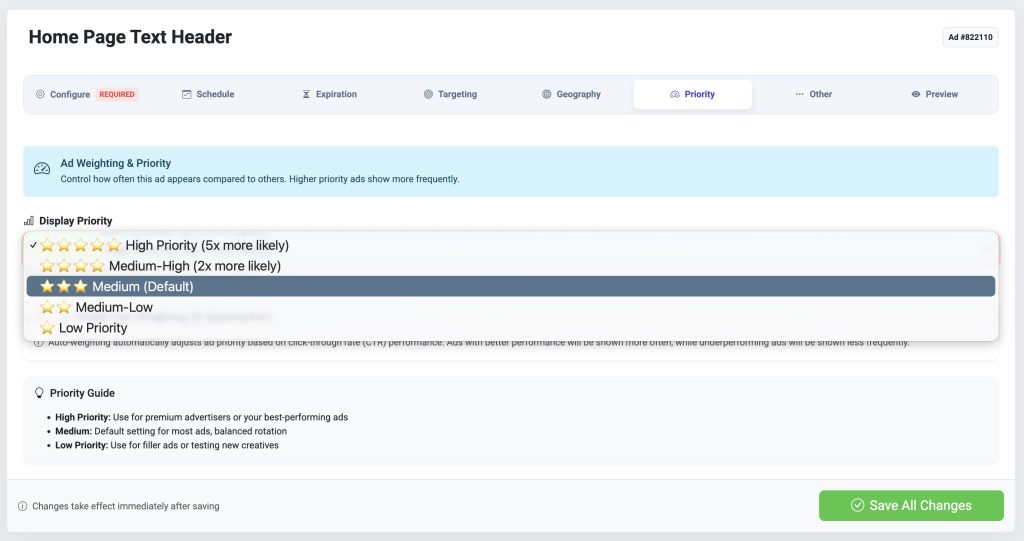
How to Change the Weight of an Ad
To modify an ad’s weight:
- Edit the ad you want to adjust
- Open Ad Settings
- Click the Weighting tab
- Select High, Medium, or Low
- Save your changes
No restart or cache clearing is required.
Auto-Weighting (Performance-Based Priority)
AdPeeps also supports Auto-Weighting, which automatically adjusts ad priority based on performance.
- Ads with strong click-through rates (CTR) are shown more often
- Ads that perform poorly are gradually shown less
- This happens automatically over time
Auto-weighting is useful when optimizing banner ads or text ads without manually monitoring results.
Best Practices
- Use High weight for paid or top-performing ads
- Use Low weight for internal, house, or filler ads
- Avoid setting too many ads to the same weight if you need predictable output
- Combine weighting with impression limits for tighter delivery control